Digimedia Dynamics is the processor that sits in the transmission path. It takes a stereo signal from a soundcard, runs it through twenty-five stages — levelling it, shaping its spectrum and holding an absolute ceiling — and returns it to a soundcard. Alongside that it feeds up to eight internet streams and records what went out in hourly files, and eight slots take your own VST plugins wherever the chain needs them. Dynamics runs as a background service, so it starts with the machine and keeps going whether or not anyone is looking at it; the interface is a browser page and only a remote control.
The chain
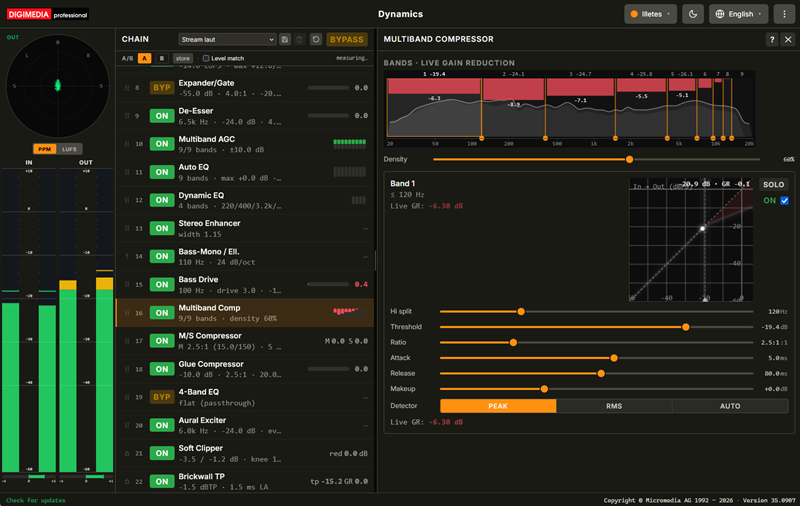
Every stage is a row, in signal order, showing its number, an ON or BYP button, and a one-line summary of what it is currently set to — plus a small live meter where there is something to show, such as gain reduction. Click a row to open that stage; click ON or BYP to take a single stage out of the path without disturbing its settings. Bypassing removes a stage from the signal path entirely rather than merely zeroing its effect, and the Bypass button in the header does that to the whole chain at once, which is the honest A/B against the untouched signal.
Most of the chain can be reordered by dragging a row. The first four stages are fixed at the front because they work on the converter's own waveform and have to see it unaltered, and the last two are fixed at the back, because a true-peak ceiling is only a guarantee if nothing follows it. Bass-Mono has no handle of its own: it rides directly behind the Stereo Enhancer, whose widening it exists to undo in the low end. The order lives on the server, so every connected browser sees the same chain.
What the stages do
The chain reads front to back as a sequence of jobs. Work from the front: a problem fixed early does not have to be fought later, and every stage left bypassed is one less thing colouring the sound. Eight slots for your own plugins can also sit between these stages; those slots are described in the next section.
| Group | Stages |
|---|
| Clean up the source | Bandpass, De-Hummer, Declipper and an eight-band De-Hisser, then De-Lossifier, which rebuilds the top a lossy codec removed, and Phase Rotator, which evens out asymmetric waveforms to win headroom. |
| Set the level | AGC R128 applies a slow trim toward the loudness target, and Expander/Gate keeps pauses and background noise from rising with it. |
| Give back the punch | Natural Dynamics lifts the first few milliseconds of drum hits and percussive attacks that heavy mastering has flattened. It can be weighted so kick and bass get more of the lift than the cymbals — punch rather than edge. |
| Balance the spectrum | De-Esser, a nine-band Multiband AGC for long-term spectral balance, Auto EQ pulling the relative spectrum toward a target curve, and Dynamic EQ, which acts only while a resonance is actually present. |
| Shape the sound | Stereo Enhancer, Bass-Mono for transmitter stability, True Bass, which synthesises a missing bass fundamental from its overtones, Bass Max, which combines a bass resonator, an optical bass leveller and tube warmth in one stage, Bass Drive for the harmonics a small speaker needs, and 4-Band EQ and Aural Exciter at the end. |
| Create density | Multiband Comp does most of the work, with M/S Compressor and a gentle Glue Compressor behind it. |
| Hold the ceiling | Soft Clipper rounds off the peaks so the limiter pumps less, then Brickwall TP measures inter-sample peaks and holds the absolute ceiling — the one stage that must never be bypassed on air. |
Your own plugins
Eight slots take any 64-bit VST3 or VST2 plugin and put it straight into the broadcast chain. Each slot is a row like any stage, so you drag it to wherever it is needed — a favourite de-esser early on, a tape emulation ahead of the multiband compressor, a stereo widener just before the limiter. The fixed head and tail stay where they are, so nothing can end up behind the ceiling. Every slot has its own wet/dry mix for parallel processing, and its own bypass.
A plugin that crashes does not take the broadcast with it: its slot is switched off, the incident is logged, and the audio keeps running.
The workspace
Three columns: the meters on the left, the chain in the middle, and the parameters of whichever stage you selected filling the rest. Every detail panel is built the same way — the picture first, then the live values, then the controls — so once you have learned one stage you can read all of them. A question-mark button adds a description of the stage above the picture, and it is one switch for every panel: leave it on while you are learning the chain, off once the pictures speak for themselves. A reading with no signal behind it shows a dash rather than a number.
Several panels let you work in the picture instead of the sliders: drag an EQ band sideways for frequency and up or down for gain, drag a compressor's threshold line, drag the crossovers between bands, drag along the stereo width arc. The sliders follow, and they stay the authority on range and step size. Every slider takes a typed value, steps with the arrow keys, goes back to its default on a double-click, and moves ten times finer with Shift held.
One warning worth reading twice. This processor has no monitor path — its output is the transmission. So the Solo button in a multiband band editor mutes the other bands for every listener, not only for you. While a solo is live, every connected browser shows a red notice above the chain with a button to clear it, and any browser may clear it.
Metering
The meters column exists so you can compare the input with the output: two stereo meters side by side, with a switch between peak-programme and loudness. The PPM bars follow IEC 60268-10 ballistics — a fast rise, a decay of about 11.7 dB per second and a peak-hold line — while the loudness reading is EBU R128, momentary over a 400 ms window for what the ear is hearing now and gated integrated for the number a regulator cares about. A true-peak readout in dBTP sits alongside.
Above them, a goniometer draws the output as a Lissajous figure and a correlation bar says the same thing as a number: vertical and +1 is mono, a wide horizontal cloud below zero is partly out of phase. Below −60 dBFS the correlation glides to the centre and reads exactly zero, because a needle swinging across a third of the scale on an idle machine reads as a fault.
Ten of the panels draw a one-sixth-octave spectrum behind their curve: the input as a faint area, the output as a line. Showing both is the point — the gap between them is what the chain is doing to the material at that frequency.
Presets and banks
Seven presets ship with the processor. Signature is the house sound and the default: more bass and punch than the source, with the top end as the recording has it. Powerful is warm, dense and pushing; Broadcast Music is the same idea held back; Speech is built for the spoken word; Classic lets large dynamics survive, so a pianissimo stays quiet; Stream is dense, built for the loudness normalisation of streaming platforms, with the most true-peak reserve of all; and Transparent keeps only the protection — the Bandpass high-pass and the true-peak limiter — and so serves as the honest comparison point for the others. The louder presets deliberately leave more true-peak headroom, because a lossy encoder adds overshoot of its own. Store what is running under a name of your own at any time; a preset you save is a complete snapshot, including the order of the chain.
Three banks sit under the chain header: Chain A and Chain B, the two production banks, and Temp, a scratchpad. Copying a bank into Temp also switches the output to Temp, so what you try there is on air while the original bank stays untouched; once you like the result, commit Temp to either production bank. A switch between banks lands on a buffer boundary and is blended across that boundary, so a change on air is inaudible. There is no level matching anywhere in the product: what you hear is what goes out, so to compare two banks fairly by ear, match their loudness targets first.
Straight to your listeners
Dynamics carries its own streaming encoders, so the processed signal goes to your internet radio servers without separate encoder software. There are eight independent connections, each switched on and watched on its own: Icecast 2 with MP3, AAC, Ogg Vorbis or Opus, and Shoutcast v1 and v2 with MP3 or AAC, at 64 to 320 kbps. A web player can take a high-quality stream while mobile listeners get a lighter one, both from the same processing. Each connection shows the bitrate it is actually delivering, and says plainly when it is connected but has no audio instead of pretending to be live.
Track titles reach MP3, AAC and Ogg Vorbis listeners as the songs change. Your playout system can write them to a file, send them as a UDP datagram or pass them over WebSocket; Dynamics takes each change to every connected server, and a stream that reconnects is sent the current title at once, so nobody is left on a song that has already ended.
An archive of what went out
The File Writer records the processed output continuously as 24-bit stereo WAV — one folder per day, one file per hour — in exactly the format Digimedia Logger reads, with a peak file beside each recording so that Logger can scrub it without reading the audio. A gap of up to two seconds stays in the same file; after a longer silence the file is closed and the audio that follows starts a new one. An existing file is never overwritten, not even when the clock repeats an hour at the end of daylight saving time. The destination is chosen with a built-in folder browser that lists the drives of the machine running the service, not those of the one you happen to be browsing from. Recording can never interrupt the broadcast: a slow or full disk costs you the recording, never the air.
Running it unattended
The processor is built to sit in the transmission path for months. Every parameter change takes effect live, without interrupting audio. Applying a preset, reordering the chain or reloading a stage is recorded with the time and the user, so the question of who changed the sound, and when, has an answer. Changing a soundcard or the buffer size is the one kind of action that restarts the audio stream and costs a brief dropout, which is why both live in the configuration rather than on the main screen. Input and output can be two different cards. Their two clocks then drift slowly apart, and drift compensation keeps that from causing a click every few minutes.
Access is two-tier. A browser on the machine itself is never asked for a password, which is what makes it impossible to lock yourself out, and access from the network is refused outright until a password has been set — not merely unprotected. The password can only be set locally, so nobody on the network can claim the first one. Updates are offered in the About drawer rather than fetched on a schedule: the installer's checksum is verified before it runs, and your configuration, presets and change trail live outside the installation directory, so they survive every update.
Licensing
This is a free tool. No obligations to buy anything. Downloads are provided “as is,” without warranty of any kind. Micromedia AG assumes no liability for any damages arising from their use. A licensed enterprise edition with support is available on request. Please contact us for a quote.
System requirements
| Component | Requirement |
|---|
| Operating system | Windows 10 or Windows 11, 64-bit |
| Audio interface | Any WASAPI or ASIO soundcard with a stereo input and a stereo output; input and output may be different cards |
| Plugins | Optional: 64-bit VST3 or VST2 |
| Network | Only for internet streaming and for access from other machines |
| Browser | Any current browser — Chrome, Edge or Firefox |
| Privileges | Administrator rights for installation only |